Questo articolo manca, è obsoleto o non è ancora stato verificato in italiano. Viene mostrata la fonte inglese autorevole.
Amministrazione
Configure an organization and reporting entity
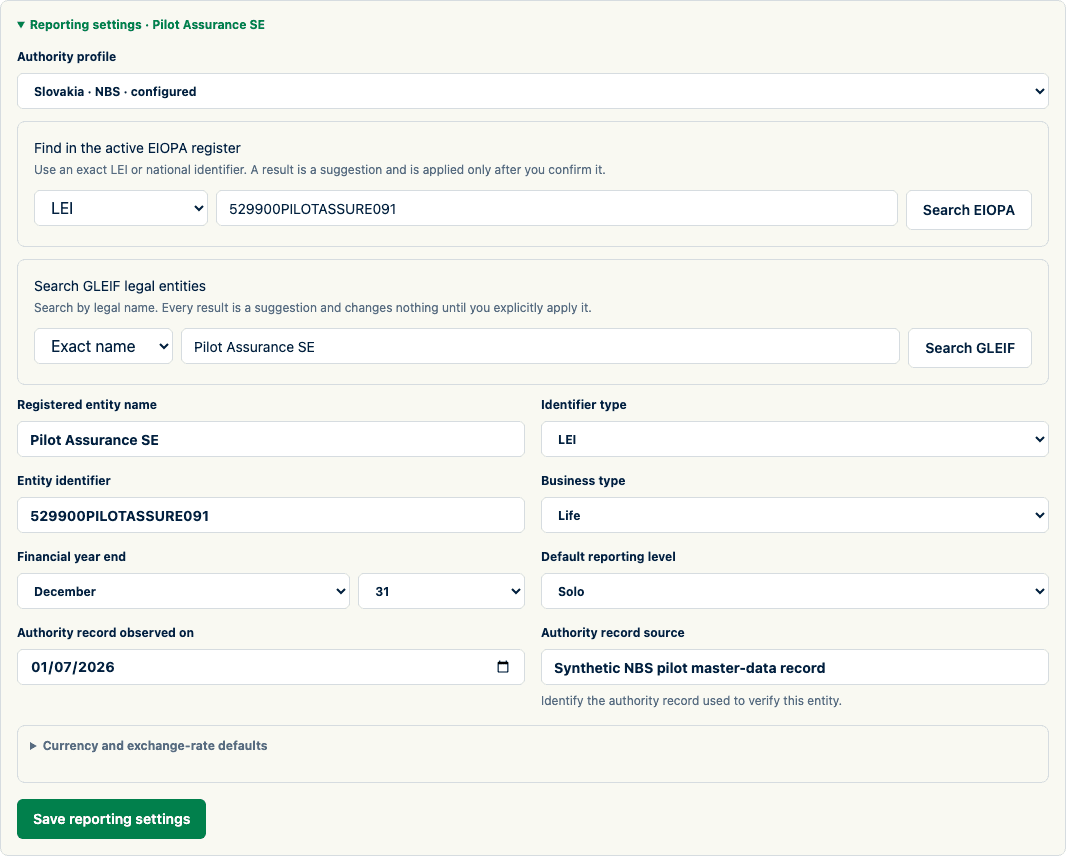
Create the workspace and record the identity and reporting defaults used by filing cycles.
Who can perform the task
An authenticated user can create their first organization and becomes its administrator. Only administrators can later edit reporting-entity settings.
Operator-provisioned demo accounts are an exception: their organization and synthetic preset already exist, and the demo-only account cannot create another organization.
Before you begin
Have the approved legal or internal organization name, reporting-entity name, identifier and identifier type. For reporting defaults, obtain business type, financial year end, currencies, and approved exchange-rate source descriptions.
Quick path
- Open Administration and create or select the organization.
- Record the organization identity and reporting defaults.
- Add the reporting entity using its verified legal identity and authority identifiers.
- Configure jurisdiction, currency, reporting level, and other approved defaults.
- Save the settings and verify them before creating a filing.
Detailed guidance
- On Filings, use Create your organization when no workspace exists.
- Enter the organization name, reporting-entity name, and identifier.
- Select Create workspace.
- From the organization card, select Reporting settings, or open Organization settings from the authenticated navigation menu.
- Add reporting entities and manage ingestion service accounts on this dedicated administration screen. These durable controls are intentionally kept out of the filing-priority queue.
- Under AI mapping, an organization administrator can enable or disable suggestions for the organization. This saves the organization's opt-in; it does not grant platform approval or configure the external provider. The status tells you when either prerequisite is still missing. Contact support for platform approval or provider configuration. AI mapping remains off until all three conditions are met.