Monitor filings, deadlines, ownership, and blockers - SolvencyBridge Help
Straipsnio nėra, jis pasenęs arba dar neperžiūrėtas lietuvių kalba. Rodomas viršenybę turintis šaltinis anglų kalba.
Administravimas
Monitor filings, deadlines, ownership, and blockers
Use the operational portfolio to decide which filing needs attention and who owns the next action.
Versija 2026.8.14 minAdministratorius · Rengėjas · TikrintojasPeržiūrėta 2026-09-06
Who can perform the task
Administrators, preparers, and reviewers can use the filing portfolio. What they can open or change still depends on organization membership, role, and table-level access.
Before you begin
Confirm that each filing has the correct reporting entity, period, due date, owner, reviewer, and applicability decisions. The portfolio summarizes filing state; it does not replace opening a filing and checking its evidence.
Quick path
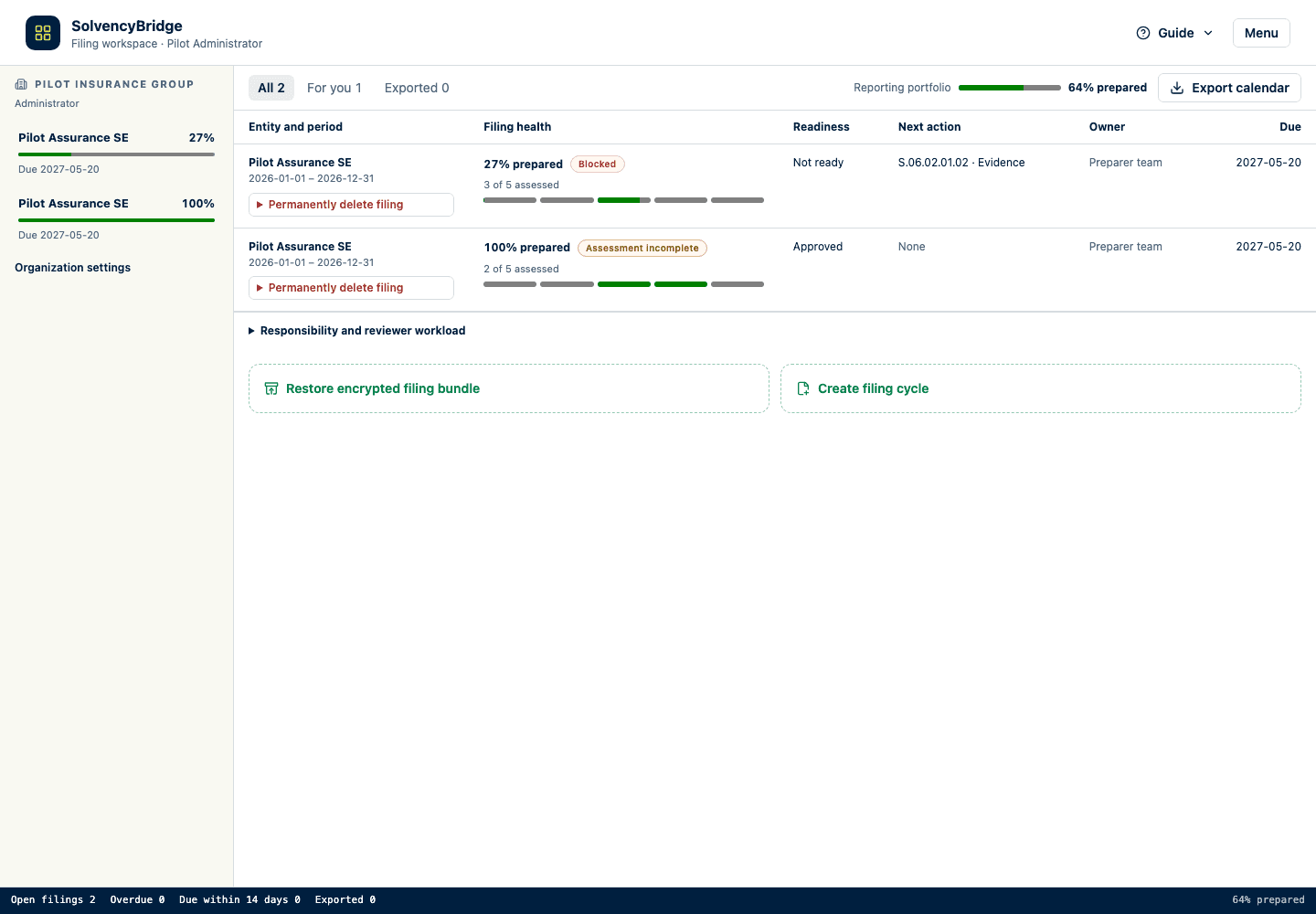
Open Reporting portfolio in the workspace navigation and review work requiring attention, deadline totals, and preparation summaries.
Select For you to show the filings that need action from your role.
Open the most urgent filing and inspect its ordered next action.
Assign or confirm the owner and resolve the named blocker.
Select Filings to see the complete portfolio or create and restore filings. Returning to a category resumes its last open document or view.
Detailed guidance
Use the compact activity bar on the left to move among Reporting portfolio, Filings, Mapping workspace, and IRRD when IRRD is enabled. In a filing, the same bar also opens filing-specific views such as templates and validation issues. Hover or focus an icon to see its label. Organization settings, billing, administration, Help, and sign-out appear only when available to your account. Help opens separately so it does not replace active work.
Open Reporting portfolio for work requiring attention, or Filings for the complete portfolio and filing setup or recovery controls.
Review Open filings, Overdue, Due within 14 days, and Exported.
Use All, For you, and Exported to switch between the complete portfolio, work selected for your role, and completed exports.
In the reporting portfolio, compare the entity and period, Filing Health, readiness, next action, owner, and due date. Filing Health separates preparation progress from the Ready, Blocked, or Assessment incomplete readiness result.
Use the five compact indicators to compare data completeness, validation, evidence, review, and export readiness. Hover or focus an indicator for its labelled value. Not assessed means the product cannot measure that area from the available records. It is omitted from the percentage and keeps the filing from showing Ready.
The portfolio shows only the highest-priority blocker as its next action; it does not expand hundreds of blocker groups inside the table. Open the action to go directly to the relevant filing table, validation findings, evidence, review, or export-readiness control. In the filing workspace, the first three blockers remain explicit and further blockers are summarized by health area with one action per area.
Expand Responsibility and reviewer workload to see who owns filing, template, issue, explanation, and review work.
Open the filing with the highest-priority unresolved work.
Use its ordered next actions to navigate to the exact applicability, template, validation, review, or export control.
Expected result
The team can identify which filing needs attention, why it is blocked, and who owns the next action without opening every reporting table. A high preparation percentage remains visibly blocked whenever a required readiness check is unresolved.
How to verify
Open a filing from the overview and confirm its period, due date, Filing Health, readiness, ownership, and next action match the portfolio row. Expand Responsibility and reviewer workload when you need assignment counts or the latest recorded export. Treat a missing export as None, not as evidence that an export failed.
Common problems
A filing can be due soon while still showing no blockers. Due date and readiness answer different questions.
A low blocker count does not make one blocker immaterial.
The percentage averages assessed dimensions. Check the assessment coverage before comparing filings, because an unassessed dimension is excluded from the percentage and keeps the filing from showing Ready.
Validation findings are grouped by reporting table for managerial triage. The portfolio deliberately keeps only the highest-priority group visible; open its action to work with the individual findings.
Reviewer workload contains assignments and counts only; it does not load filing values into the portfolio.
A stale browser view can lag a recently completed background validation. Open or refresh the filing before acting on a discrepancy.
Audit and data consequences
Opening the overview does not change a filing. Actions taken inside a filing remain subject to its role, revision, workflow, and audit controls.
Product and regulatory limitations
Portfolio readiness is derived from recorded product state. It does not prove regulatory completeness, portal submission, receipt, or authority acceptance. Filing Health covers preparation through authority-package readiness only.