Keep Excel without keeping the spreadsheet chaos.
Turn existing Excel, CSV, or ODS source files into a reviewed, taxonomy-pinned Solvency II XBRL export with mapping previews and source lineage.
Automate the last mile of Solvency II
Bring source data, supported validation, review, and controlled EIOPA XBRL export into one clearer Solvency II Pillar 3 QRT reporting workflow.
Import Excel (.xlsx), CSV, and ODS sources, plus pinned EIOPA XBRL and supported national XBRL inputs.
English product screenshots use synthetic data. The example export is a reference ZIP, not a submission package.
For teams preparing QRTs from source files with separate preparer and reviewer roles. Before a trial, confirm the authority, taxonomy and required export, and agree an owner, reviewer and synthetic example.
Import Excel (.xlsx), CSV, and ODS sources, plus pinned EIOPA XBRL and supported national XBRL inputs.
Video in English; synthetic Slovak Q3 2026 data, EIOPA 2.8.2-hotfix QRS. EIOPA XBRL export, not supervisory submission.
The player connects to YouTube only after you choose to load it.
Synthetic Slovak Q3 2026 demonstration. EIOPA 2.8.2-hotfix QRS. AI-generated English narration. EIOPA XBRL export only; no national XML export, supervisory submission or authority acceptance is demonstrated. Let’s follow one reporting cycle, using synthetic Slovak data. We start with an Excel portfolio. The import preview shows what will change, using a mapping that’s already approved. After checking the preview, we apply it to the filing. Now we run validation. Here, the total assets figure doesn’t agree with the underlying detail. Instead of searching through spreadsheets, we can follow the finding back to the reported value. We correct that total to thirty million euros and run validation again. The related errors clear. A price warning remains, and that needs a separate review decision. Before sending the filing for review, we attach the supporting note. In this example, ten thousand units at the recorded price give a value one hundred euros below the reported amount. The note explains that difference. We submit this filing revision for an independent reviewer to decide whether that warning is acceptable. The reviewer can see the finding, the evidence and the proposed explanation together. For this synthetic example, they accept the one hundred euro difference for this filing revision. That’s a waiver, not a passed validation rule. The decision stays recorded with the filing. Once the reviewer approves and locks it, the preparer can’t quietly change the approved values. Finally, we export the approved filing as EIOPA XBRL. This is a local export, not a submission to a supervisor, and it doesn’t demonstrate Slovak national XML. That’s the workflow: bring in source data, resolve findings, review independently and export the approved result. Request a guided evaluation, and we’ll first confirm whether your reporting scope fits.
We first confirm your reporting scope and demonstrate the relevant workflow. Where appropriate, we then agree a free 14-day trial with an owner and a success criterion. Sending this form does not activate a trial or schedule a meeting.
Request a guided evaluationPreview your file, reconcile proposed changes and rejected rows, then apply the reviewed data.
Help Centre: Preview before anything changes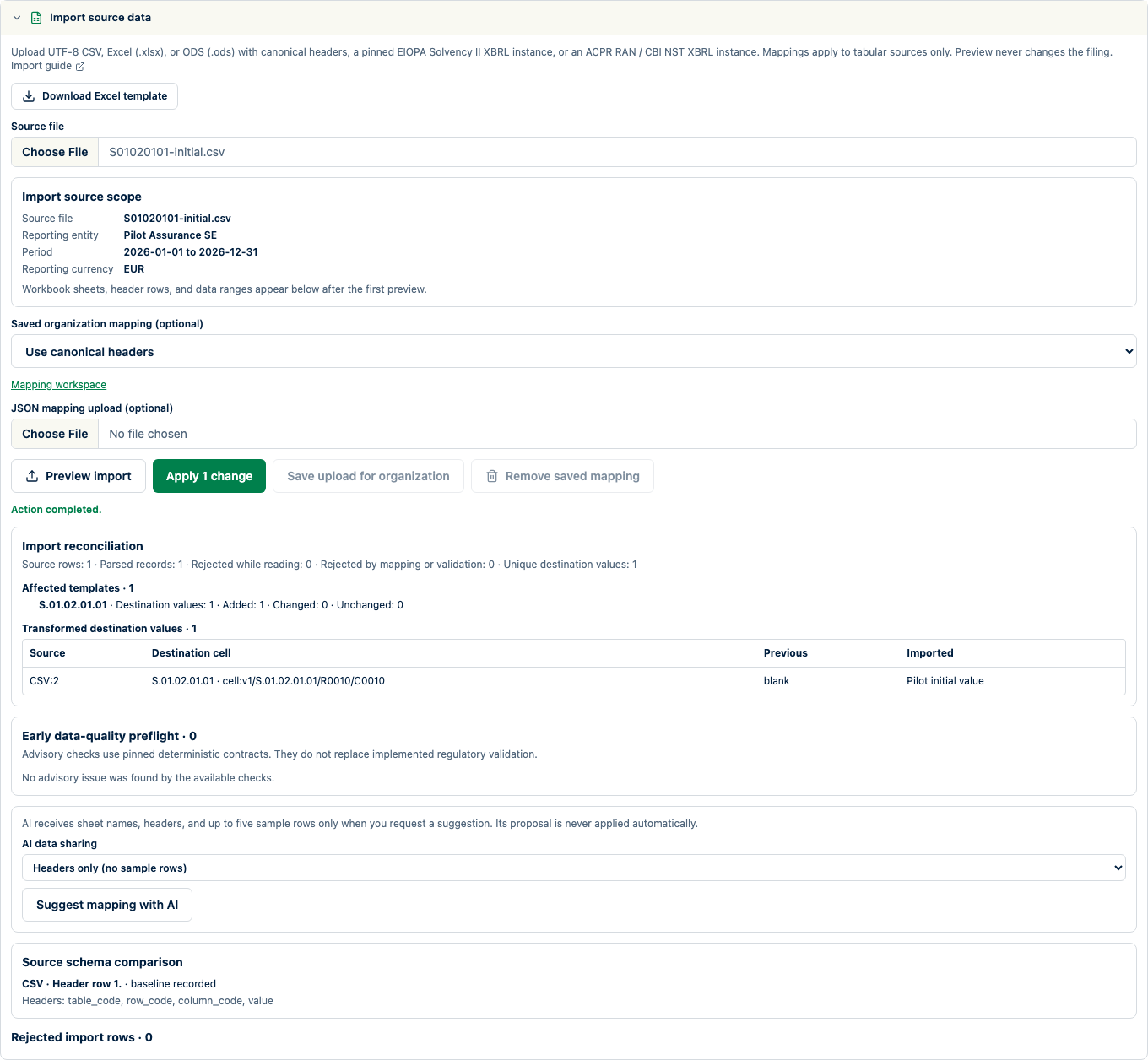
Open each finding, correct its source and rerun the supported checks. Review coverage and unresolved limitations.
Help Centre: Validate before you file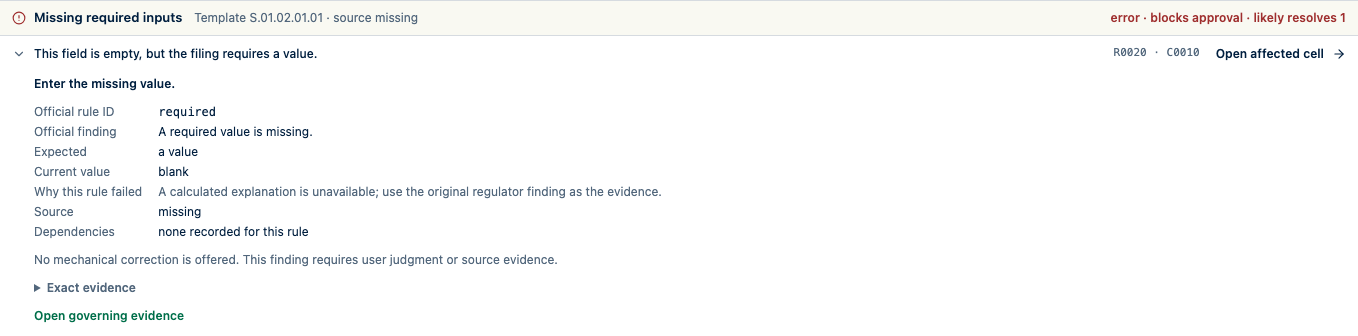
Assign a reviewer, resolve comments and approve the filing to lock the reviewed snapshot.
Help Centre: Keep review moving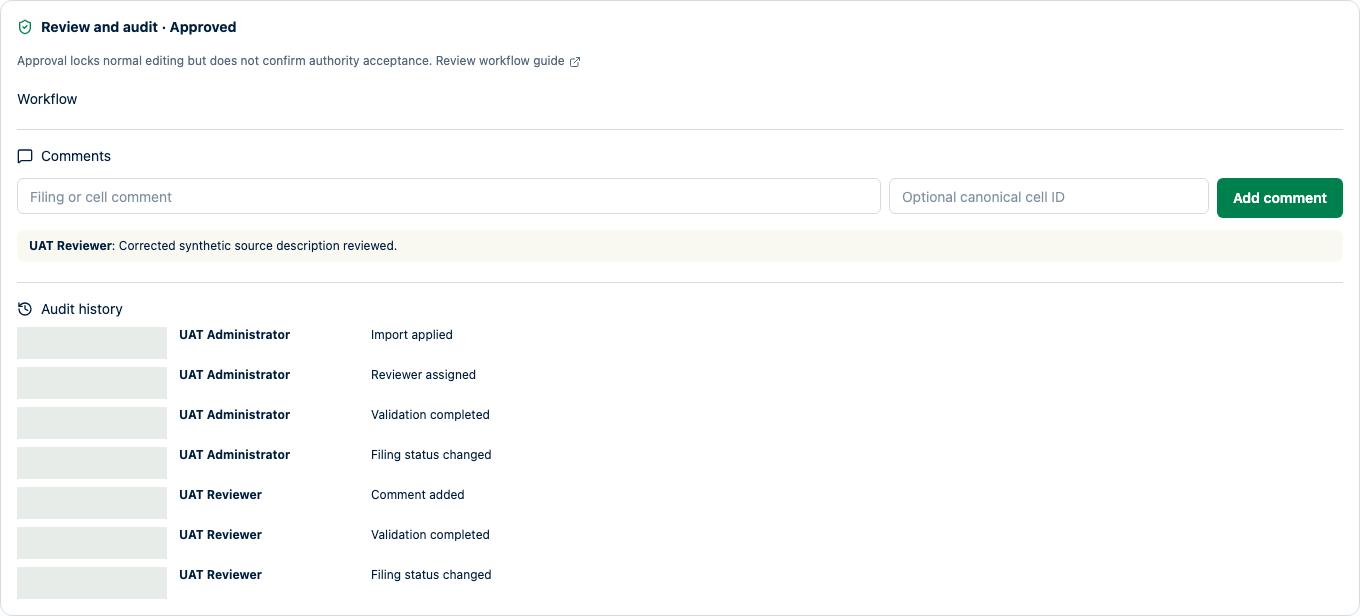
Check readiness, generate from the approved snapshot and verify the artifact’s entity, period and taxonomy. Submission and acceptance remain external.
Help Centre: Create controlled exports
Resources
Turn existing Excel, CSV, or ODS source files into a reviewed, taxonomy-pinned Solvency II XBRL export with mapping previews and source lineage.
Import Excel (.xlsx), CSV, and ODS sources, plus pinned EIOPA XBRL and supported national XBRL inputs.
Run deterministic checks supported for the selected EIOPA release and jurisdiction, with actionable issues connected to the reporting workspace.
Check current and next-year Solvency II annual and quarterly reporting deadlines, EU solo and group baselines, and verified authority schedules.
No. Validation covers the implemented rules for the selected taxonomy release and jurisdiction. Your team still confirms applicability, completeness, and the authority's current requirements.
No. SolvencyBridge prepares, validates, reviews, and exports supported artifacts. Submission, receipt, and authority acceptance remain outside the product.
Tell us about your entities, source files, authority, deadline, and where the current close slows down. We will shape the conversation around that filing.