Review a filing
Approve and lock a filing
Understand and verify the consequences of the final internal review decision.
Who can perform the task
The assigned reviewer with complete review access, or an administrator. Follow your organization’s separation-of-duties policy even when an administrator technically can approve.
Before you begin
Confirm the entity, period, taxonomy, jurisdiction, applicability, values, validation coverage and findings, evidence, comments, and correction history. Resolve any uncertainty that should block approval.
Quick path
- Open the assigned filing and confirm that preparation is complete.
- Review values, movements, validation findings, rule controls and waiver requests, comments, evidence, and audit history.
- Resolve or formally return every item that prevents approval.
- Select Approve and lock and confirm the exact filing identity.
- Verify that the approved snapshot is locked and ready for export checks.
Detailed guidance
- Open Review and audit while status is Ready for review.
- Complete the review in Open and review an assigned filing.
- In Validation rule controls, approve or reject each pending filing waiver. Approval requires the assigned reviewer; administrators cannot use the organization-wide disable control as a substitute for this decision.
- Inspect every organization-disabled rule and approved filing waiver, its scope, reason, and evidence. These exclusions do not count as passed rules.
- Select Approve and lock only when authorized to make the internal decision.
- Refresh and inspect the filing.
Expected result
Status becomes Approved. Normal value editing, imports, and preparation changes are locked. Approved export controls become available.
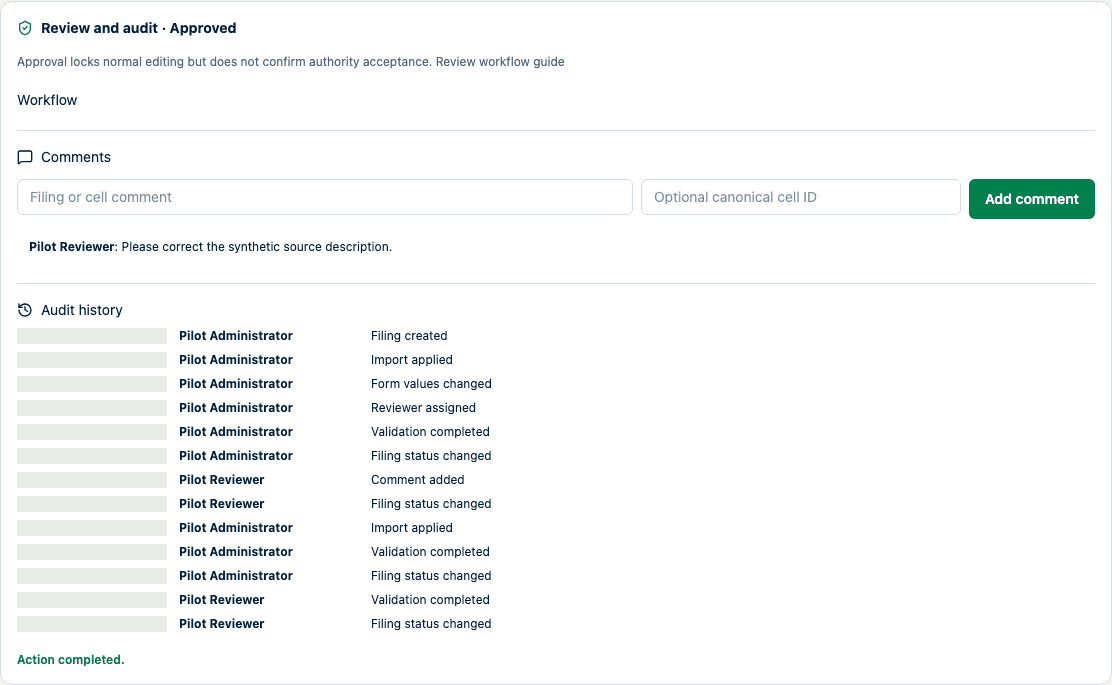
The status is approved, while the nearby guidance preserves the authority-acceptance boundary.
How to verify
Check the approval audit event, actor, time, status, validation summary, effective rule exclusions, and locked controls. The approval snapshot retains the exact rule exclusions used for the decision. Generate an export only after this check. A filing-specific waiver approved for the reviewed revision remains effective after approval and export. Reopening or requesting changes ends that approval boundary; a changed filing needs a new waiver decision. Rule controls remain locked for approved and exported filings.
Common problems
Approval is unavailable when you are not assigned or your review allowlist omits a selected table. Do not ask an administrator to bypass a required independent review; correct the workflow setup.
Locking and data consequences
Approval is a high-risk action. It locks the reviewed snapshot. An administrator can reopen only with a recorded reason. Reopening after export means earlier artifacts represent an older snapshot and must not be mistaken for the current filing.
What approval does not confirm
Approval does not prove regulatory correctness, completeness of unsupported rules, portal submission, receipt, or authority acceptance.