Administration
Connect a partner through the ingestion API
Create an entity-scoped service account, prepare a draft with Python, R, Julia, or JavaScript, and retrieve validation findings without bypassing user review.
Quick path
- Create an entity-scoped service account with only the required ingestion permissions.
- Store the credential securely and share it once through an approved channel.
- Start with a Python, R, Julia, or JavaScript example to create a draft, bulk-fill it, and retrieve validation results.
- Have an authorized product user inspect and confirm the prepared preview.
- Rotate or revoke the credential when the integration or access requirement changes.
What the API does
The versioned API can list the reporting entities granted to a service account, create a configured draft filing, register a provider-neutral source, retain a checksum-bound dataset, and create an asynchronous import preview. A partner can send mapped CSV or Excel data, or up to 100,000 canonical filing facts in one bulk payload. The API returns bounded reconciliation counts, paginated import, preflight, and validation findings, and a link for an authorized product user to review the result.
The API does not apply filing values. A service account cannot approve, lock, export, submit, or silently change a filing. A current preview must be explicitly confirmed by an administrator or preparer with edit access through the normal filing workspace.
Choose a starter for your regulatory reporting workflow
The API is designed for regulatory reporting teams who work with data frames, workbooks, and repeatable close processes. Download the OpenAPI contract when you need a machine-readable description, then download a maintained synthetic starter:
- Download the Python starter uses
requestsand produces ordinary Python dictionaries that can be placed in a pandas data frame. - Download the R starter uses
httr2and returns lists that can be converted to data frames or tibbles. - Download the Julia starter uses
HTTP.jlandJSON3. - Download the JavaScript starter is available for JavaScript users.
Each example reads SOLVENCYBRIDGE_URL, SOLVENCYBRIDGE_INGESTION_CREDENTIAL, and SOLVENCYBRIDGE_REPORTING_ENTITY_ID from the environment. Do not paste the credential into a notebook, workbook, source file, support ticket, or shared output. The companion examples/ingestion-api-examples.md explains the required packages, synthetic profile, retries, and review handoff.
Create a service account
- On the portfolio page, open the organization and expand Ingestion service accounts. Only an organization administrator sees this control.
- Enter a descriptive name, choose an expiry of no more than one year, and select only the required scopes and reporting entities. A filing scope requires at least one explicit entity grant.
- Select Create service account.
- Copy the displayed
<account UUID>.<secret>credential into the partner's approved secret store. SolvencyBridge shows it once and retains only its SHA-256 hash. - Rotate the credential on personnel, system, or suspected-secret changes. Rotation immediately invalidates the previous secret. Revoke the account when the integration ends.
Available scopes cover reporting-entity discovery, draft filing creation, source creation, dataset creation, preview creation or cancellation, and preview status and finding reads. There is no apply, approval, lock, export, or submission scope.
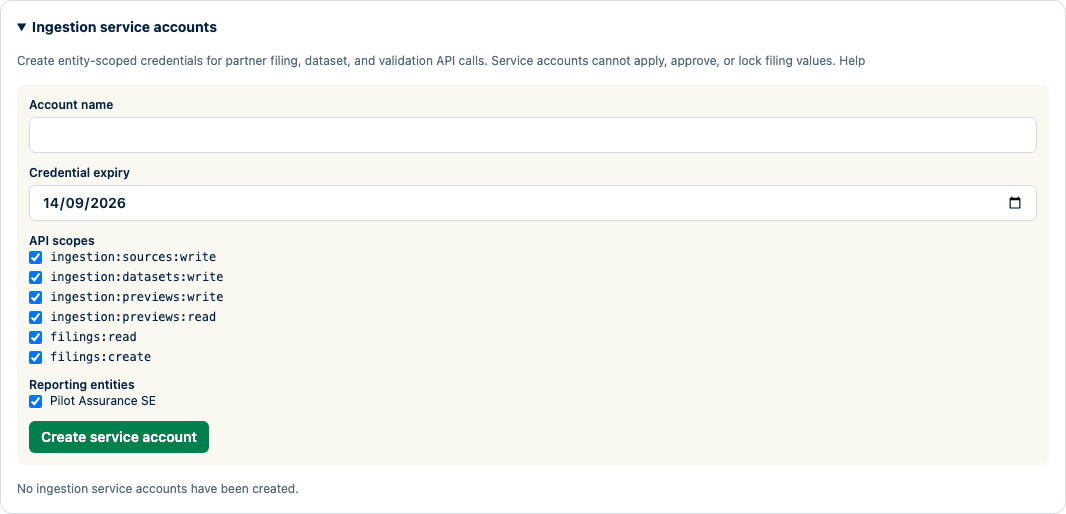
The credential is displayed only after creation or rotation and is not included in documentation screenshots.
Create, bulk-fill, and validate a draft
- Call
GET /api/v1/reporting-entitiesand choose a granted entity whose response saysfilingCreationReady: true. - Call
POST /api/v1/filingswith a newIdempotency-Key, reporting period, reporting level, report type, authority profile, financial-statement source reference, and any initial required templates. The response is always a draft and includes its pinned taxonomy and form inventory. - Register an
uploadsource, or anhttps_referencesource whose exact host the operator has allowlisted. - Create a dataset with another idempotency key, exact byte count, lowercase SHA-256, filename, and media type. Supply either base64-encoded bytes or one HTTPS URL, never both.
- For bulk direct filling, use
application/vnd.solvencybridge.facts+jsonwith schema versionfacts-v1. Each fact contains a canonicalcellIdand a string or booleanvalue. Send decimals as strings; JSON numbers are refused so their precision cannot change. CSV and Excel continue to use a reviewed saved mapping. - Create a preview with the dataset ID and filing ID. Add the saved mapping ID and exact revision for CSV or Excel; omit both for canonical facts.
- Poll the returned preview ID while its state is
queuedorprocessing. When it isready, page throughGET /api/v1/ingestion/previews/{previewId}/results. A page contains at most 200 import, preflight, and validation findings. - Send the returned review link to an authorized product user. In Import source data, the user reviews the changes and findings and selects Confirm and apply preview.
The preview pins the organization, filing and form revisions, taxonomy checksum, parser version, mapping and transformation checksums, dataset ID, and source checksum. Changed source bytes or current filing inputs make it stale; the partner must create a new preview.
Retry, cancellation, and retention
- Every create request requires an idempotency key of 8–128 permitted ASCII characters. The same account, operation, key, and canonical request replays the exact retained response for 24 hours. Reusing the key with another request returns
idempotency_mismatch. - Dataset and preview resources expire after seven days. Preview jobs retry at most three times.
- A queued or processing preview can be cancelled. Terminal previews cannot be changed through the service-account API.
- CSV input is limited to 10 MiB and
.xlsxinput to 20 MiB. HTTPS references must use an exact operator-allowlisted host, cannot redirect, and must match the declared size and SHA-256. - Canonical facts input is limited to 20 MiB and 100,000 facts. Detailed result artifacts are checksum-verified, limited to 32 MiB, and exposed only through opaque cursor pages of at most 200 findings.
- Shared Valkey-backed limits apply per organization, service account, and scope in a 60-second window: 30 write requests or 120 read requests. Responses include
X-RateLimit-Limit,X-RateLimit-Remaining, andX-RateLimit-Reset; a429also includesRetry-After. Requests fail closed with503 service_unavailableif the shared limiter is unavailable.
Errors and safe operations
Every response returns an API version and correlation ID. Error envelopes contain a stable code, safe message, and retryable flag. Authentication failure, missing resources, and cross-organization identities intentionally share a not-found response. Ordinary logs and responses exclude credentials, raw source rows, filing values, and private preview-artifact locations.
Service-account filing, source, dataset, preview, result-read, and cancellation events are recorded separately from the attributable product-user confirmation event.
Contract and example
- Download the OpenAPI 3.1 contract.
- Download and run the Python, R, Julia, or JavaScript starter for a synthetic create-and-fill facts flow after setting the environment variables named above.
- The public customer and partner contract is always rooted at
/api/v1. Signed-in product routes, scheduler hooks, public metadata downloads, and authentication endpoints are separate product or operational surfaces; they are not part of this service-account contract. v1changes only when an existing request or response must break. New optional fields and new operations can be added to v1. The response fieldapiVersion: "2026-08-04"is the current legacy contract revision; use the major route and the OpenAPI contract version when checking compatibility.
The synthetic example proves contract behavior only. Keep a real partner pilot gate open until representative data, authentication and hosting constraints, an operational tester, and a committed outcome are retained.
Product and regulatory limitations
The API creates only draft filings and stages CSV, .xlsx, or canonical facts as a reviewable preview. It is not a workflow, export, submission, connector, or authority-acceptance API. Database, SFTP, object-storage, SharePoint, ERP, actuarial, and security-master connectors remain partner-specific work and are not implied by this contract.