Administration
Create a filing cycle and confirm applicability
Use the guided setup to derive the period, deadline, taxonomy, module, and initial filing work.
Who can perform the task
Administrators and preparers can create a filing cycle. Administrators own organization and entity configuration.
Before you begin
Confirm the reporting entity, authority profile, reporting year, annual or quarterly cycle, supervisory or public-disclosure purpose, reporting level, and approved template-applicability basis. The reporting entity must have reporting defaults and at least one authority profile.
The public Solvency II reporting deadlines page is a planning reference for routine calendar-year annual and quarterly reporting. It is not the filing deadline shown here: the filing setup derives that date from the selected entity, period, reporting level, and authority profile. Confirm the derived date against the applicable authority instruction, including any entity-specific decision, exemption, national form, event-driven obligation, non-calendar-year adjustment, or portal cut-off.
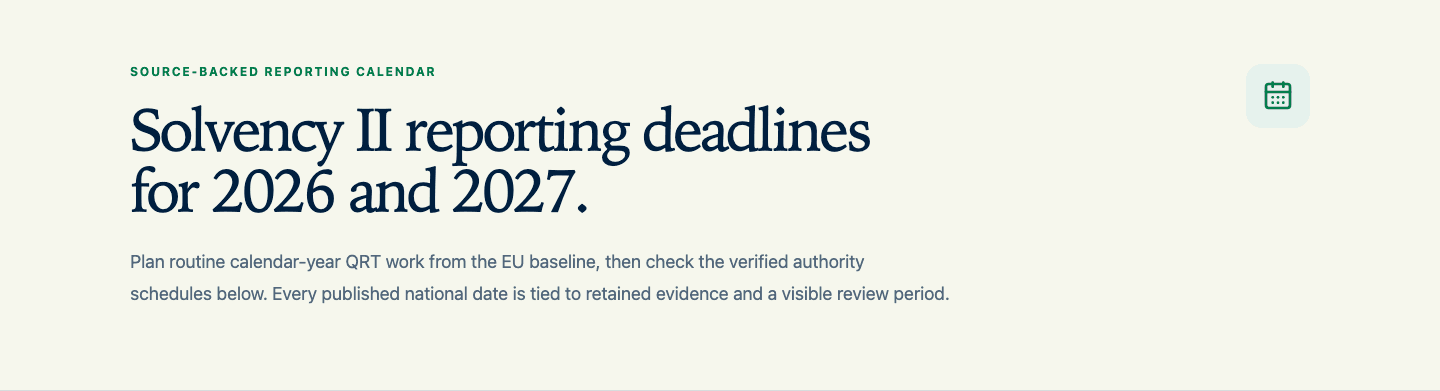
Choose a country, deadline year and solo or group reporting level in the public calendar. Each row identifies either the EU baseline or a verified authority schedule and links to its official sources. Where national evidence covers only some periods, the remaining rows stay labelled as EU baseline dates. Incomplete authority coverage means that some or all dates in that year lack national verification; it does not invalidate the verified rows. For example, the retained Liechtenstein schedule covers solo reporting, so group dates remain baseline-only.
Next deadline shows the earliest date on or after today within the selected country, year and reporting level. It is omitted when all selected dates have passed. Its scope and baseline or authority status remain visible.
Use Link to this view to bookmark or share the selection. Download calendar (.ics) exports the selected dates as all-day events with their scope and sources. The file is a snapshot, not a subscription: download it again after source updates. It contains no private filing or organization data and does not replace the private calendar derived from authorized filing records.
The taxonomy link explains how the reporting reference period determines the release; the deadline year alone does not determine it. Italy's retained IVASS attachment verifies quarterly 2026 periods and annual 2026, including their 2027 submission dates. It does not establish all Italian deadlines for either year. Financial-stability reporting and national surveys remain outside this public supervisory QRT calendar. Confirm filing-specific instructions and portal cut-offs before submission.
Quick path
- Open Filings and select Create filing.
- Choose the organization, reporting entity, reporting period, and reporting authority profile.
- Confirm the taxonomy, module, currency, and filing deadline.
- Review the derived applicability decisions and resolve anything that needs confirmation.
- Create the filing and verify its identity before importing or entering data.
Detailed guidance
- On Filings, expand Create filing.
- Choose the reporting entity and reporting authority.
- Enter the reporting year and choose annual or quarterly reporting.
- Choose supervisory or public disclosure and solo, group, or branch.
- Review Derived filing setup. The product derives the exact period, deadline, required Solvency II taxonomy version, and module from the selected context. YE 2026 periods through
2026-12-31remain on EIOPA2.8.2-hotfix. Q1 2027 and later periods use EIOPA2.10.0; do not move a 2026 filing onto the Review package early. - Stop if the derived taxonomy is not installed or the context is not valid. Do not substitute another taxonomy or module.
- Search the module-compatible template catalog and select the initial required working set. Templates not selected here remain Needs confirmation; they are not silently marked non-applicable.
- For a 2027 filing, review the National Review evidence notice. If its legal or authority evidence is incomplete, confirm the preparation-only boundary. The confirmation is tied to the profile, period, taxonomy, evidence checksum, actor, and time. It does not unblock export or submission. Evidence dates apply to the selected jurisdiction: an EEA incorporation observation does not refresh EU notification evidence. A draft EEA Joint Committee Decision still leaves incorporation and national implementation pending; a recent observation alone does not establish submission readiness. The separate National authority review shows the research date, finding and official source. It does not renew the legal evidence or unblock submission. See national authority reviews for the meaning of each finding.
- Select Create filing and open it.
- In the filing navigation, choose Manage templates. Search the combined catalog or filter it by EIOPA or the national authority, then add the templates needed for this filing. An added template becomes available for preparation immediately. The EIOPA catalog follows the filing’s reporting module: public-disclosure and supervisory templates are not interchangeable. The navigation separates EIOPA and national forms and reports how many EIOPA forms are editable. If an older filing contains selected templates outside its module, it reports that mismatch and marks those templates in Manage templates so they can be reviewed and removed with a reason. If the filing purpose is wrong, create a filing with the intended purpose. Included national forms remain accessible even before an EIOPA template is required. If no template was selected during setup and the filing has no automatically required base schedule, the filing opens this template-applicability step directly instead of showing an empty workspace.
- To remove a template from the filing, choose Remove, enter the reason, and confirm. Removal excludes the template from completion, validation, and export without deleting its entered values or history. Adding it again restores the same work. The filing must retain at least one required EIOPA template.
- Use National reporting status only when an included national form is a nil or not-filed return. Forms that require explicit reported values do not offer that shortcut, and a populated form must be cleared before it can be changed to nil or not filed.
- Expand the applicability details when a decision requires Required, Not required, or Needs confirmation together with its rationale and evidence. Business-type decisions can be saved in separate groups: for example, confirm S.28.01 as required for a non-life undertaking, then confirm S.28.02 as not applicable. Each saved group must use the correct regulatory basis. Remaining decisions still need confirmation before submission or approval.
- In What happens next, follow the ordered action. Its Open control takes you to the exact applicability, template, validation, review, or export control that currently owns the next step.
Expected result
The filing header and portfolio show the intended entity, period, jurisdiction, status, and due date. The filing uses the derived taxonomy and module. Required templates appear in completion and validation; unresolved templates remain visible as blockers until explicitly decided.
For a preparation-only 2027 filing, the filing retains the exact confirmation snapshot. Export, authority packaging, and submission readiness remain blocked until the current national legal and authority evidence gates pass.
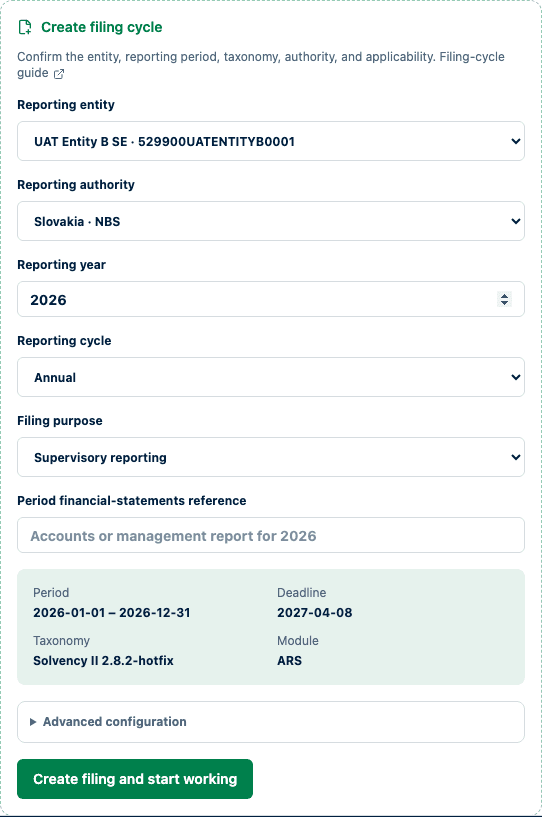
The derived setup makes period, deadline, taxonomy, and module visible before creation.
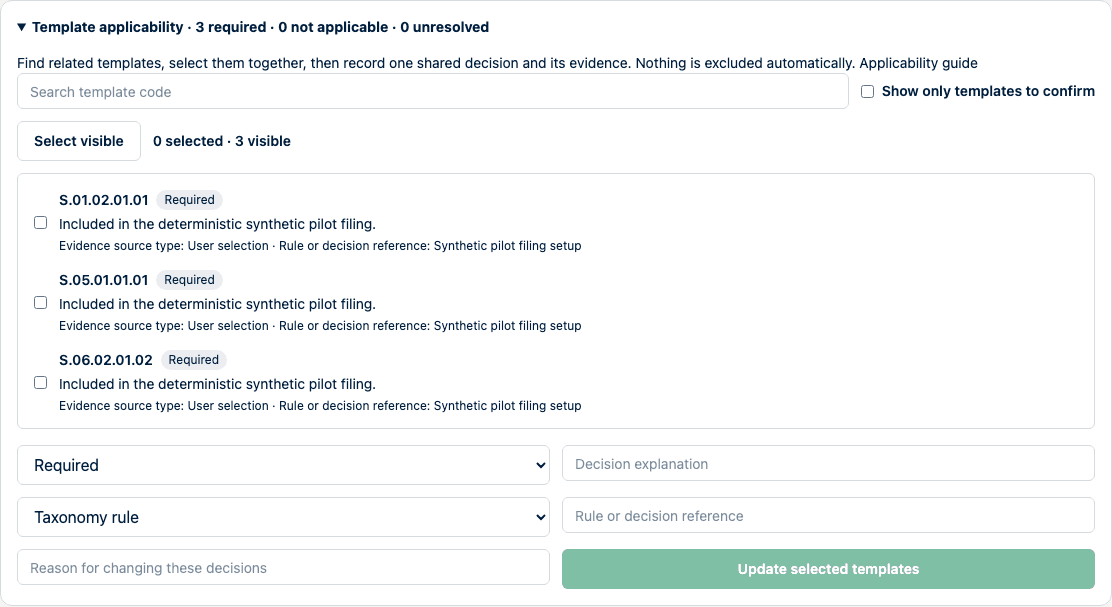
Template membership is managed in one place. Detailed applicability decisions remain explicit and evidence-backed inside the same drawer.
How to verify
Compare the filing identity and applicability summary with the approved instruction. Confirm the derived taxonomy version and module before importing data. Resolve all Needs confirmation decisions before review. Confirm the installed taxonomy package identity against the approved release record.
Common problems
- Configure the entity and authority profile first means the reporting defaults or authority profile are incomplete.
- If the derived setup is invalid, correct the entity, authority, year, cycle, purpose, or reporting level.
- If the needed taxonomy is not installed, stop and ask the operator to install the approved package.
- If a template is missing after creation, open Manage templates and search the combined catalog rather than importing into another table. A template marked Not in this module cannot be edited in that filing; remove the incorrect selection or create a filing with the intended reporting purpose.
- Removing a template does not delete its saved values. Add it again to restore the prior work, or clear the values explicitly if they should no longer be retained.
- Confirm the National Review preparation boundary means the current profile has no fresh, checksum-bound legal or authority evidence sufficient for export readiness. Review
/coverage, confirm only if draft preparation is intended, and do not treat the confirmation as transposition evidence. - A blocked action states what is missing. Use Open rather than searching manually for the affected control.
Audit and data consequences
Template membership and applicability determine which forms are part of completion, validation, and export. Removal preserves values and attributable history so the choice can be reversed. A wrong decision can omit required information or include an inappropriate template. Preserve the basis for each decision.
Regulatory limitations
The product can guide and record applicability; it does not make the regulatory determination for your organization.
Directive (EU) 2025/2 and the related Review framework apply from 30 January 2027 at EU level. The product separately tracks Member State measures notified through EUR-Lex and EEA incorporation evidence. An official notification is not proof that transposition is complete or correct, and neither the tracker nor a preparation confirmation is legal advice, proof of compliance, regulator approval, or authority acceptance.
Existing French filings: RAN-ENS 1.8.1 migration
Existing unexported French filings dated 31 December 2026 or later migrate from RAN-ENS 1.8.0 to 1.8.1 during the database upgrade. They return to draft and must pass validation and approval again. The migration retains the complete original form values, including excluded forms, for reference; it does not alter exported filings or immutable snapshots. Reopening an exported filing for these periods migrates its working forms to 1.8.1 in the same operation and requires fresh validation and approval. Its exported snapshot remains unchanged. Earlier periods remain pinned to 1.8.0.
FR.30.01 C0170 tenant NACE values cannot be converted automatically from NACE 2 to NACE 2.1. Their original facts are retained in the migration record and removed from the active facts. A blank NACE 2.1 field preserves each tenant row, even when it contained only the old NACE value. Enter a reviewed NACE 2.1 value in the national form, or import a corrected 1.8.1 instance. You can delete a row that no longer belongs in the return or correct its identifier. Every remaining tenant row, including renamed rows, still requires a valid NACE 2.1 selection. A missing or invalid replacement continues to block review and export, even if the old and new code would have been spelled the same. Other incompatible facts remain available and are reported by the normal national-form validation checks.
Form selection and the editor use the filing's pinned release. If a deployment has not applied the migration yet, the filing remains blocked for release mismatch; recreating the filing is not required. Administrators can inspect the preserved source values through the national form's payload diagnostics. The audit history records the release change and previous filing state.