Prepare a filing
Automate recurring filing preparation
Schedule source previews, work from one exception inbox, generate a current reviewer pack, and interpret measured value safely.
Who can perform the task
Preparers and administrators create, pause, or resume recurring schedules and confirm deterministic bulk corrections. Any filing member can inspect runs, exceptions, reviewer-pack state, and measured value. Reviewers and administrators accept a resolution only after its validation state has passed.
Before you begin
- Save and approve the reusable import mapping revision.
- Configure a read-only PostgreSQL query or customer-controlled watched-folder source. The form stores configured source identifiers, not credentials.
- Confirm the schedule timezone and the first UTC run time.
- Configure the background scheduler and notification webhook if unattended previews or reminders are required.
Quick path
- Open the automation settings for the organization and reporting entity.
- Choose the recurring reporting cycle and the approved source and mapping.
- Configure preparation, validation, ownership, and notification boundaries.
- Run or review a controlled preview before enabling unattended preparation.
- Enable the schedule and verify the next run, owner, and stop conditions.
Schedule recurring previews
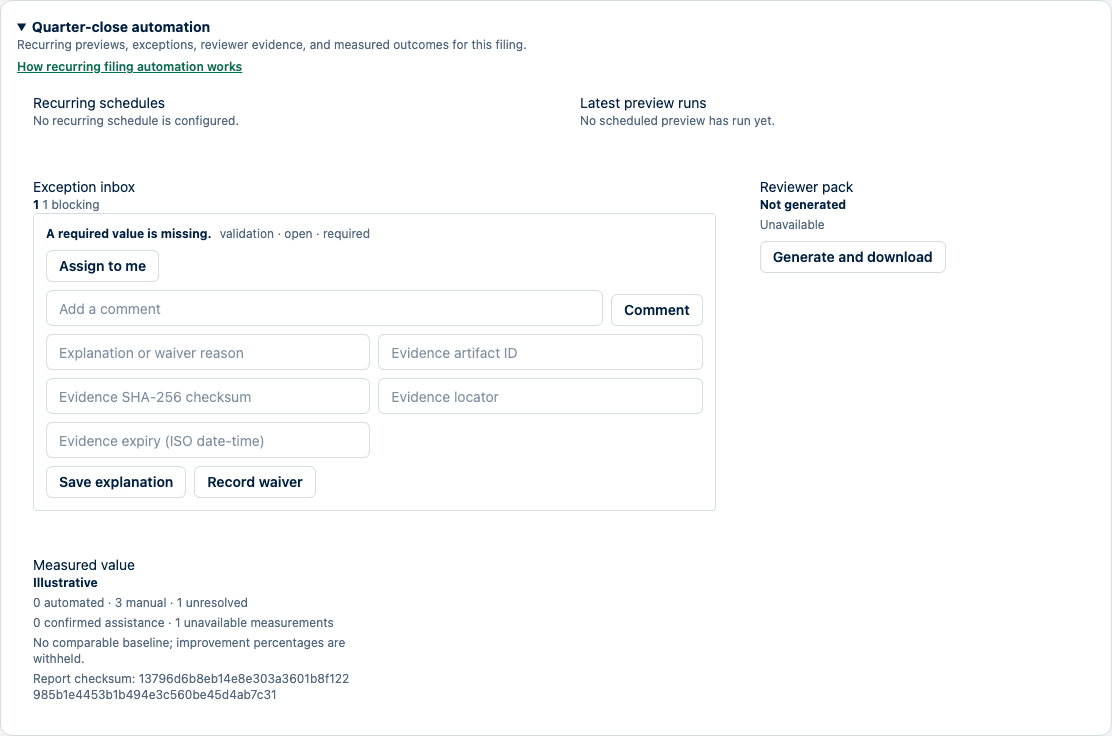
- Open the filing and expand Quarter-close automation.
- Select the approved mapping and source type.
- Enter the configured query or folder ID, source name, timezone, and next run time.
- Select Create schedule.
- Use Pause or Enable without changing the retained mapping revision.
Each scheduled run is preview-only. It binds the parser, mapping revision, taxonomy, locale, source, and transformations to exact fingerprints, then evaluates source drift and configured reconciliations. The outcome is Ready, Needs review, Source unavailable, Configuration blocked, or Product failure, with bounded next actions. Applying filing values still requires the normal authorization and explicit confirmation boundary.
Work from the exception inbox
The inbox combines failed reconciliations, source drift, validation root causes, missing evidence, enrichment conflicts, stale explanations, and review blockers.
- Start with blocking, overdue, and material items at the top.
- Assign the item to yourself and add a due date or comment as needed.
- For a judgment item, add an explanation plus an evidence artifact ID, SHA-256 checksum, locator, and optional expiry. A waiver records the same evidence but does not convert a failed blocking rule into a pass.
- For a repeated mechanical cause, inspect the confirmed batch preview. Apply confirmed corrections is available only when all items have the same root cause, rule, reversible resolver version, safe preview, and form revision.
- After confirmation, SolvencyBridge recalculates and validates the complete filing atomically. The batch is refused if a selected issue remains, a new issue appears, another issue changes, or a revision is stale.
- A reviewer accepts a resolution only after the recorded validation state is passing.
Daily reminder planning can notify an assigned owner when an exception is overdue, has waited for review for 24 hours, or references evidence expiring within seven days. Notifications contain the filing link and reason, not filing values, root-cause text, comments, evidence locators, source rows, credentials, or attachments.
Generate the reviewer pack
Select Generate and download in the reviewer-pack card. Generation is refused until the current validation materialization is available. The downloaded JSON contains:
- current/prior comparison identity and material movements;
- current validation identity and counts;
- accepted resolutions and unresolved exceptions;
- source and mapping fingerprints;
- exact evidence references and the ordered reviewer queue; and
- a checksummed evidence dossier with separate validation, import, mapping, migration, approval, export, and submission-boundary sections; and
- per-contribution checksums plus one pack checksum.
Submission-boundary events document what the product recorded. They do not prove receipt or authority acceptance; those states require explicit authority evidence.
The pack is stored for the filing. It becomes Stale when any contributing fact, mapping, source, explanation, evidence, validation result, or approval state changes. Regenerate it before review; stale conclusions are not carried forward.
Interpret measured value
The filing card separates deterministic automation, confirmed assistance, manual work, unresolved work, and unavailable measurements. It also records mapping reuse, imported share, drift, exception and correction counts, review duration, export success, support interventions, and automation cost when each measurement has an observed source.
Improvement percentages are withheld unless a retained, comparable baseline is available. Synthetic or seeded reports are labelled Illustrative and cannot be exported as customer outcomes or case-study evidence. The displayed checksum binds the report contents.
How to verify
- Confirm a scheduled preview did not change filing values.
- Compare the retained run fingerprints with the approved mapping and source.
- Inspect the exception history for actor, time, rule, resolver version, confirmation token, before/after references, and resulting validation state.
- Hash the downloaded reviewer-pack bytes and compare the digest with the response checksum and pack checksum.
- Confirm the value report abstains from unsupported baseline or customer claims.
Common problems
- Configuration blocked means a required mapping, source, transformation, or reconciliation setting must be corrected before the preview can be ready.
- Source unavailable is distinct from a product failure; follow the run’s next action without placing credentials in comments.
- A bulk preview disappears when any item, remedy fingerprint, or revision differs.
- Reviewer-pack generation returns a conflict while current validation is still being materialized.
- An accepted exception never means authority acceptance of the filing.
Audit and data consequences
Creating or pausing a schedule changes automation configuration. Preview runs and notifications do not apply filing values. Confirmed corrections change filing facts atomically and create a value-safe audit event. Explanations, waivers, comments, evidence references, and reviewer decisions become retained filing records. Reviewer-pack generation stores a checksummed review artifact.
Product and regulatory limitations
Automation executes configured deterministic controls; it does not replace professional judgment, complete regulatory validation, or authority submission. Coverage evidence and public claims remain limited to their stated maturity. Customer-specific identity, connectors, deployment, licensed data, and submission transport remain separate capabilities.