Prepare a filing
Enrich and reconcile S.06.02 asset data
Compare controlled security-master and authoritative reference data with filing values before accepting any field.
Who can perform the task
Administrators and preparers can enrich an editable S.06.02 form. Locked or in-review filings cannot be changed.
Before you begin
Keep the customer-controlled security master and its approved mapping. Use checksum-valid identifiers in the filing. GLEIF enrichment accepts an exact LEI or an ISIN covered by GLEIF's ISIN-to-LEI mapping; ECB currency evidence requires a three-letter quote currency and the required conversion date.
Quick path
- Open the S.06.02 asset-enrichment workspace for the filing.
- Select the approved public or organization reference source.
- Review exact and suggested matches together with source dates and confidence.
- Resolve ambiguous, stale, or conflicting records with human confirmation.
- Apply the approved changes and reconcile the resulting values and evidence.
Shared ECB currency evidence
For several conversion declarations on one form, use Prepare FX conversions to retrieve distinct pairs together, review calculated amounts and apply selected rates to the declaration draft. Source evidence stays attached to that form.
ECB reference-rate controls are also available in Tools for other monetary reporting forms and beside the NBS currency declaration on applicable Slovak national forms. Save other edits before retrieving evidence: retrieval advances the form revision and refreshes the workspace. You need edit access to the selected form.
Enter the original currency, reporting currency, and required conversion date, then select Retrieve ECB evidence. Both legs of a cross-currency conversion use the latest common observation date within the preceding ten calendar days. The required date and the actual observation date remain distinct. If no common date is available, retrieval fails without retaining a partial pair. Conflicting retained observations cannot supply an automatic conversion choice.
The displayed conversion factor is reporting-currency units per original-currency unit. Retained ECB observations remain quote-currency units per EUR. For example, USD 1.25 per EUR and GBP 0.80 per EUR give GBP 0.64 per USD. Review the source and actual date; do not copy an ECB quote directly as a multiplier in the reverse direction.
In an NBS declaration, an Accept · ECB choice fills the rate, actual observation date, and source reference for matching currencies. You still supply and review the original and reported amounts, the closing-rate or accounting-policy reference, and save the declaration. This choice does not change reported values or establish that ECB is the prescribed source. NBS preparation-date checks continue to require their prescribed date; a preceding-day observation is never relabelled to satisfy them.
For Article 2 conversions, use Prepare FX conversions to preview rates and apply selected records. This preserves the confirmed policy source text and links the conversion to its retained ECB observations on this form. Changing the rate, date, currencies or category manually removes that link; the declared source-policy requirements still apply. Missing CNB observations are reported separately from provider failures.
If evidence exists for both currencies but conflicts or has no common observation date, the controls explain which valuation dates need attention. Retrieve both currencies again for those dates and review the retained evidence. A currency pair that has not been retrieved does not produce a warning.
Different observation dates remain available for the same requested valuation date. Retrieving a EUR pair does not remove the earlier common date needed by a cross-currency pair. Repeating an unchanged observation, even through a different query window, reuses its originally retained source rather than adding a copy. Only a changed rate for the same currency, valuation date, and observation date supersedes the earlier quote; its previous source record remains visible as Superseded. Existing conversion declarations are not rewritten: review them and explicitly accept the new rate where appropriate. Evidence remains attached to each form, not shared across the filing. New retained evidence records the requested valuation date, actual provider query date, and observation date separately; older evidence may lack a query date.
Choose CNB under Rate source, then Retrieve CNB evidence, to retain Czech National Bank rates separately on this form. The source table quotes CZK for a stated amount of foreign currency, which may be 1, 100 or 1,000 units. SolvencyBridge normalizes this to foreign-currency units per CZK by dividing the stated amount by the published CZK rate. For example, an illustrative quotation of 100 JPY for 15 CZK gives 0.15 CZK per JPY in the displayed JPY-to-CZK conversion. The original table, amount, source link and checksum remain available for review. On a locked form or with read-only access, you can still switch Rate source to inspect retained ECB and CNB evidence. Retrieving new rates remains disabled.
CNB retrieval provides supplementary evidence. It does not enable CNB in Prepare FX conversions, Accept · ECB, NBS declarations requiring ECB, or IRRD's ECB option. Existing source policies and IRRD's exact period-end observation requirement remain unchanged. ECB and CNB legs are never combined. There is no automatic switch to another source. These are reference rates, not executable transaction prices. Approved evidence does not refresh automatically.
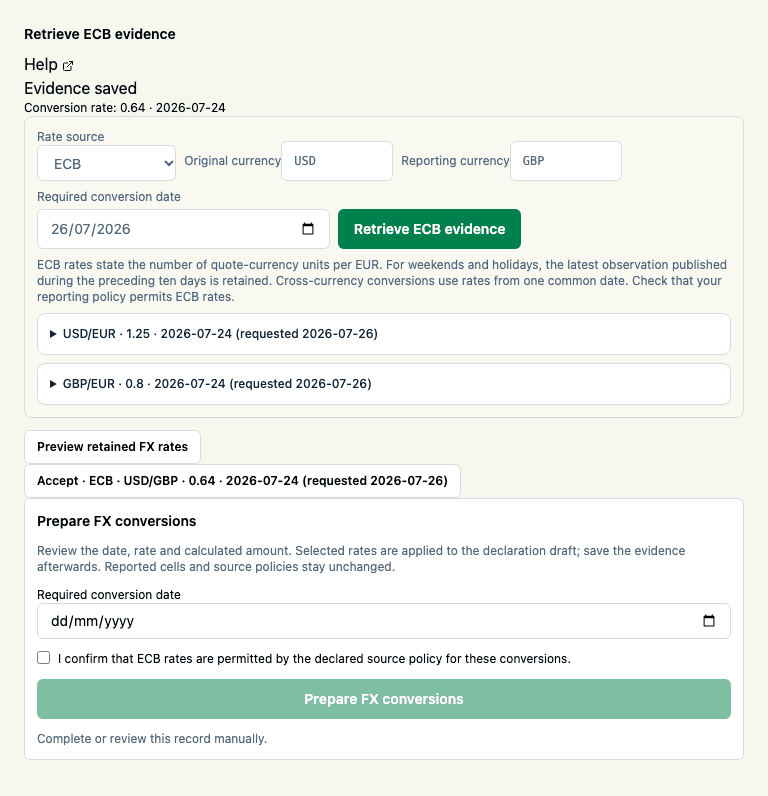
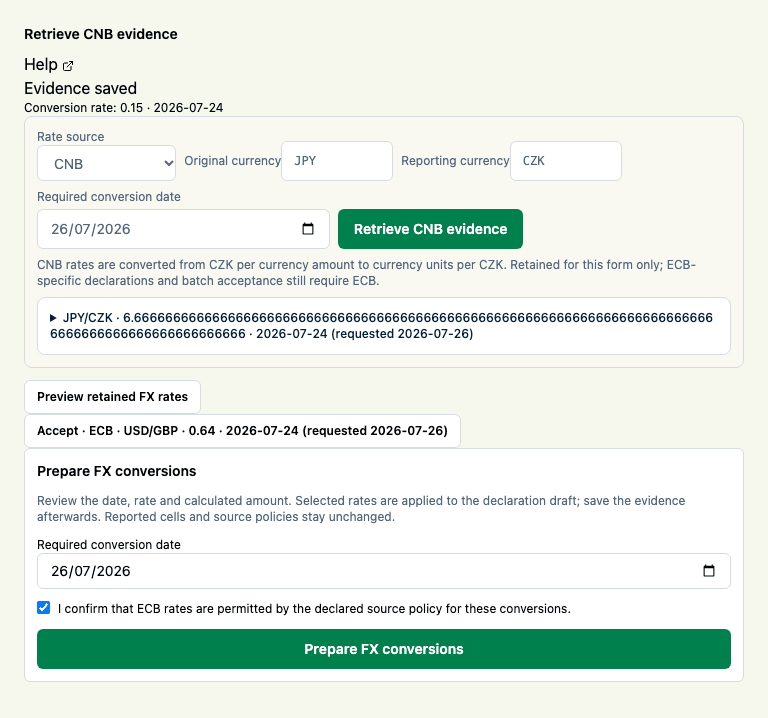
Preview retained FX rates
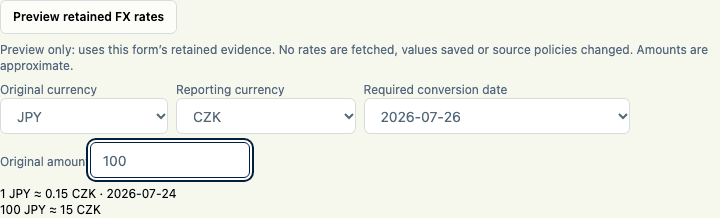
Choose ECB or CNB under Rate source, then open Preview retained FX rates. Choose the original and reporting currencies and a retained required conversion date. Enter an original amount as a plain decimal using a dot for the decimal separator. The preview shows the conversion factor, actual observation date and approximate converted amount. Results use up to 18 significant digits; they are not rounded to a reporting cell’s precision.
The preview uses only active evidence attached to the selected form and source. Both currencies must have a usable common observation date within the existing ten-day reporting lookback window. Superseded rates are excluded; missing or conflicting evidence does not trigger a retrieval. Dates refer to the original retrieval request: the preview does not reassign evidence to a different date.
You can inspect previews on locked forms and with read-only access. No network request is made, no revision advances, and no reported values or declarations are saved. Switching forms or sources clears the preview. Updated evidence is used immediately. Previewing a CNB rate does not make it eligible for an ECB-required declaration or batch acceptance. IRRD remains separate and still requires an exact period-end observation.
Detailed guidance
- Open S.06.02 and find S.06.02 asset enrichment. The filing-wide queue appears above the active table whenever the filing contains an eligible checksum-valid LEI or ISIN, retained evidence, or an unresolved retrieval.
- Review the filing-local evidence coverage, eligible ISIN/LEI row counts, conflict rows, and non-current LEI count. These metrics describe retained evidence in this filing; they do not claim that GLEIF or the portfolio is complete.
- To reconcile a customer security master:
- Choose a reusable mapping whose purpose is
security_master. - Choose the CSV or XLSX security-master file.
- Select Import security master.
- Review the retained filename, record count, and SHA-256 checksum.
- Choose a reusable mapping whose purpose is
- To retain currency-conversion evidence:
- Save other edits, then enter the original currency, reporting currency, and required date.
- Select Retrieve ECB evidence.
- Inspect the selected observation date, rate, series, source URL, payload, checksum, ECB source acknowledgement, and linked reuse terms. A weekend or holiday can use the latest observation from the preceding ten days.
- To reconcile a BIC:
- Enter the exact 11-character BIC on the intended row.
- Select Find and retain LEI.
- Review the suggested LEI, mapping publication, checksum, and complete month-specific SWIFT/GLEIF notice.
- Use the LEI only when the BIC belongs to the intended legal entity. The mapping evidence is retained with the form but does not silently replace a filing value.
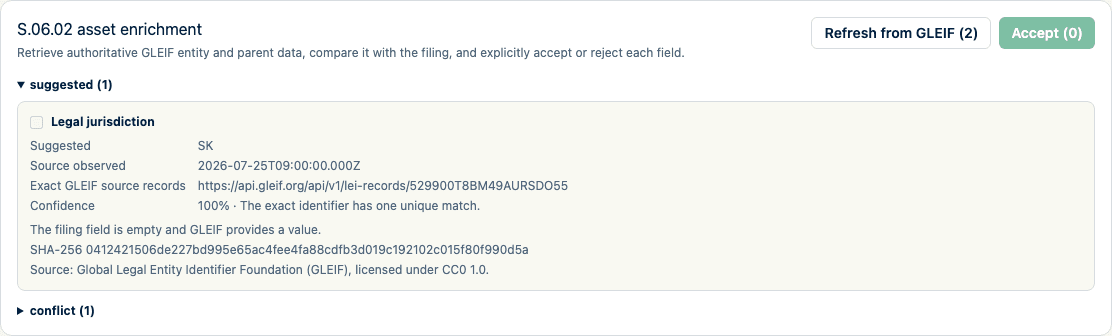
- To retrieve all eligible filing evidence together, select Refresh from GLEIF (n) in the filing-wide queue. Identical identifiers are requested once, source calls are bounded, and exact results are retained for every eligible row. Rate limits, missing records, ambiguity, and unavailable sources remain explicit queue results and do not change a filing value.
- Alternatively, for a checksum-valid LEI row, select Enrich from GLEIF or Refresh from GLEIF. For a checksum-valid ISIN row, select Find issuer LEI and enrich. When an administrator has activated a daily ISIN mapping, the exact lookup uses that checksum-pinned publication; otherwise it uses the exact GLEIF API filter. Review the retained lookup evidence before relying on the mapped issuer.
- Review the filing-wide groups for exact suggestions, already verified fields, conflicts, missing coverage, stale evidence, ambiguous results, unavailable sources, rate limits, and rejected suggestions. Compare each existing and suggested field, its state, confidence, reason, observation time, and exact target cell. The panel labels, review states, and explanations follow your selected interface language. Identifiers, authority names, observed status values, source URLs, checksums, and retained payloads remain exactly as supplied so they can be verified against the source.
- Inspect the exact retained GLEIF source records, GLEIF attribution, and linked CC0 reuse terms. When the LEI record supplies a registration-authority code, review the official authority name, jurisdiction, website, and local entity identifier. An activated Registration Authorities List supplies the authority details and retained publication checksum; the live authority API remains the fallback when the active list has no matching code.
- If the panel warns that the entity or LEI registration is not current, inspect the exact entity and registration status supplied by GLEIF.
- Select only exact, semantically mapped suggestions, then select Accept (n) once. The complete selection is refused if any form revision, target value, retained source checksum, or suggestion changed after review. Conflicts, ambiguous matches, stale evidence, calculated targets, and suggestions without an exact target cannot enter the batch.
- Accept or reject each proposed field explicitly when reviewing one field at a time. Do not accept a value when the target column is not semantically exact or the evidence does not support the filing decision.
- Re-run validation and reconcile the changed values with the original source.
- Select Download registry evidence to retain a checksummed JSON summary of filing-wide enrichment coverage, source versions, conflicts, stale fields, decisions, and unresolved fields. The report deliberately excludes filing values, identifiers, row keys, user identities, and raw source payloads.
Expected result
Accepted values are applied only to exact mapped targets. Rejected, conflicting, verified, and missing fields remain visible with their decision and provenance. The customer security master and external evidence remain checksum identifiable.
How to verify
For every accepted value, open its source record and confirm the URL, observed time, checksum, attribution, reason, and target cell. Compare the filing value with the security-master reconciliation and re-run validation. Download the registry evidence report and compare its response checksum header with the checksum inside the report.
Common problems
- Choose mapping is empty until an organization mapping with purpose
security_masterexists. - GLEIF requires an LEI means the row does not contain a checksum-valid LEI.
- A missing ISIN mapping does not make the ISIN invalid. GLEIF states that the mapping has incomplete NNA and legacy-ISIN coverage.
- Multiple issuer LEIs for one ISIN remain unresolved; the application does not invent a canonical issuer.
- A missing BIC match does not mean the BIC or entity is invalid. The monthly mapping contains current mapped pairs and omits unmapped and historical pairs.
- An ambiguous BIC match is not suggested; resolve the legal entity manually.
- A conflict is a review state, not permission to overwrite the filing.
- A suggestion without an exact target cell cannot be accepted.
- A non-current LEI warning is not an automatic rejection. Verify the legal entity, renewal or successor record, and intended reporting use.
- ECB rates are quote-currency units per EUR; do not invert or re-date them without an approved calculation basis.
- The registry evidence report summarizes retained evidence. It does not prove that an external source was complete or record transient source outages that were not retained with the filing.
Audit and data consequences
Importing a security master retains its identity but does not automatically accept every proposed filing value. Each single-field enrichment decision records its actor, time, before/after context, source, and outcome. A batch records one attributable decision plus per-target cell, snapshot, field, and source-checksum provenance; ordinary audit metadata excludes filing values and raw source payloads.
Product and regulatory limitations
Reference data assists reconciliation; it does not determine asset classification, reporting applicability, or regulatory correctness. Open-data coverage varies, and licensed-provider enrichment is not implied. Always refer to SWIFT for the latest BIC information and preserve the displayed mapping notice with any copied mapping data.