Administration
Manage public registry snapshots
Stage, review, activate, download, and restore EIOPA and GLEIF source snapshots.
Who can perform the task
A product administrator configured through the deployment’s administrator allowlist. Organization administrators can use active lookup data but cannot activate a deployment-wide source.
Before you begin
Download the official CSV from the source page. Record the publication identifier and retrieval time. For the GLEIF/SWIFT mapping, also record the mapping month shown with the file. Do not edit the source CSV.
Engineering availability is not commercial/legal approval. A commercial release that enables a public source must pass the separate source-revision and use-specific review gate. Missing, stale, rejected, incomplete, or expired review evidence blocks that gate; SolvencyBridge does not claim an approval that has not been recorded.
Deployments can also schedule authenticated staging. The scheduled job obtains the current monthly BIC-to-LEI file, daily ISIN-to-LEI relationship file, and pinned Registration Authorities List from GLEIF. It can obtain EIOPA data only from an exact operator-configured official export URL. It applies download, archive, file-count, decompressed-size, and CSV-schema limits. Scheduled staging never activates data.
Quick path
- Open the public-data administration area and select the required source.
- Inspect the active snapshot, source date, provenance, licence status, and coverage.
- Import or refresh only from the configured authoritative source.
- Review the candidate snapshot and resolve validation or legal-review blockers.
- Activate the approved snapshot and verify the recorded version and retrieval evidence.
Detailed guidance
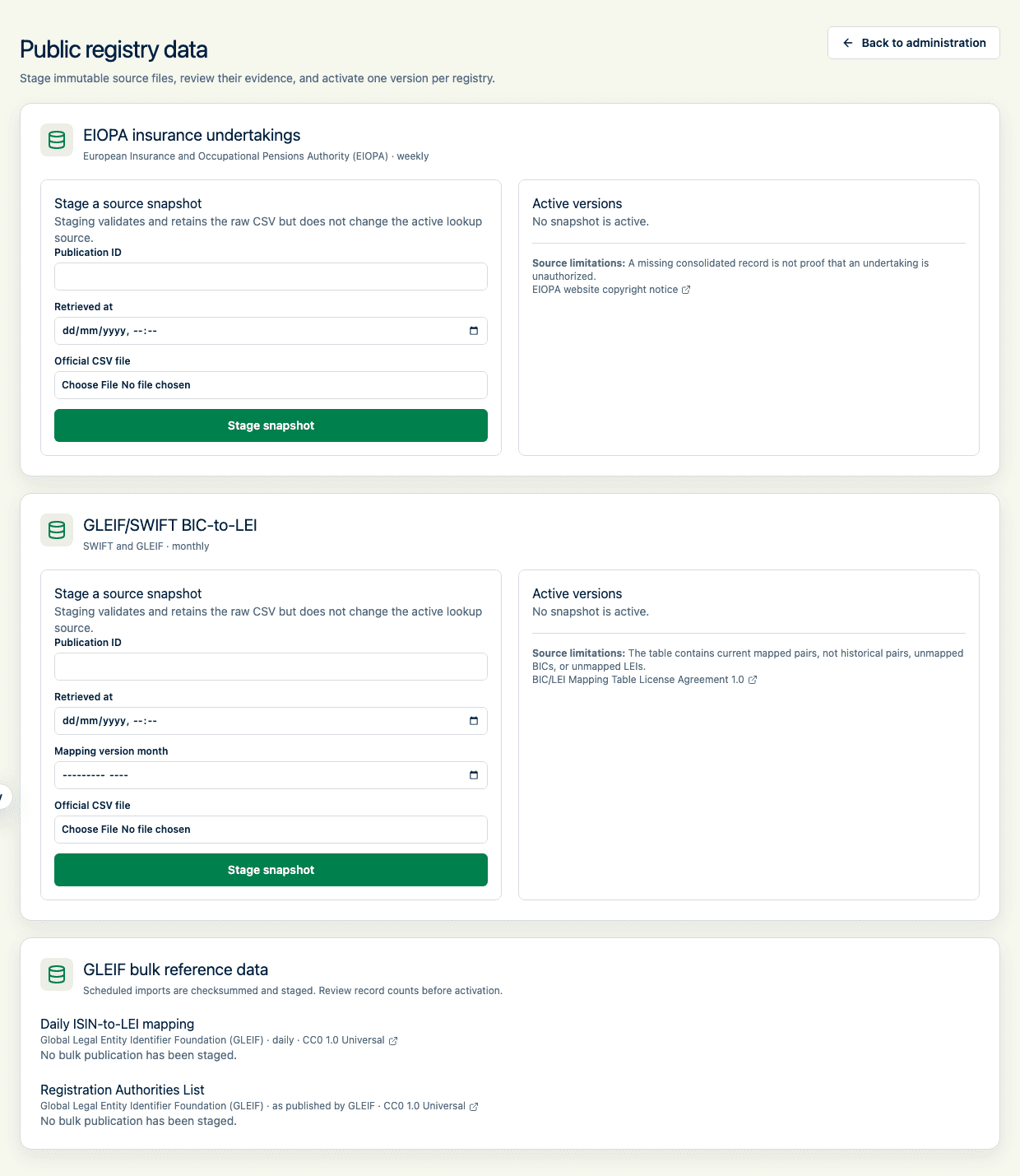
- Open Admin, then Public registry data.
- In the correct source section, enter the publication identifier and retrieval time. Enter the mapping month when staging BIC-to-LEI data.
- Select the official CSV and choose Stage snapshot.
- Review the record count, source issues, SHA-256 checksum, attribution, licence link, and completeness warning. For staged EIOPA data, also review the counts of added, removed, and materially changed undertakings and any newly ended authorizations compared with the active version. For bulk GLEIF data, verify the publication date or Registration Authorities List version before activation. Staging does not change user lookups.
- Download the retained source when you need to compare it with the official file.
- Select Activate. Only one snapshot per registry is active.
- To roll back, find a superseded version and select Restore this version.
Expected result
The chosen snapshot is marked Active and exact registry lookups use its normalized records. An active daily ISIN mapping is consulted before the live GLEIF ISIN filter, and an active Registration Authorities List supplies authority details before the live authority endpoint. Successful enrichment retains the publication identifier and source checksum. The previous active snapshot remains retained as Superseded. Bulk GLEIF activation is also reversible from the retained history.
Before promoting a new ISIN mapping revision, engineering can run npm run public-data:gleif:coverage. The deterministic representative S.06.02 portfolio reports exact coverage, missing mappings, multiple-LEI conflicts, and known false single matches separately. It is a regression benchmark, not a claim about a customer's portfolio or the full GLEIF population.
How to verify
Refresh the page and verify the active publication identifier and checksum. Download the retained source and independently compute SHA-256 when release evidence requires it. Test an exact known identifier in the reporting-entity workflow before broad use.
After restoring application storage from backup, replay each retained registry snapshot before reopening registry-dependent work. Replay reads only the retained CSV, verifies its size and SHA-256 evidence, uses the retained parser version and source metadata, and refuses the restore if the normalized assertions differ. It does not require outbound network access.
Common problems
Duplicate publication identifiers and duplicate source checksums are refused. Invalid schemas, checksums, identifiers, mapping months, dates, empty files, and oversized files are refused. Daily ISIN archives must contain exactly one CSV and are bounded at 64 MB compressed and 512 MB decompressed. Correct the metadata or obtain a fresh official source file; do not alter official data merely to make it import.
A restore is refused when the retained file is missing or altered, when its parser version is incompatible, or when replay produces different normalized assertions. Keep the database record and its raw artifact in the same backup set.
Audit and data consequences
Every version retains its raw file, normalized payload, parser version, importer, import time, and activation history. Activation affects future lookups immediately but does not modify saved reporting entities or frozen filings.
An automated refresh reports each source as staged, unchanged, not configured, or failed. It separately reports active-data freshness as current, stale, or missing. EIOPA becomes stale after 10 days and monthly BIC-to-LEI after 40 days. A failed source leaves the current active snapshot unchanged, and a newly staged snapshot does not clear a stale warning until it is reviewed and activated.
Product and regulatory limitations
Registry coverage is incomplete and source records can change. A missing result is not an invalid-entity or invalid-instrument result. The applicable national competent-authority register prevails over the consolidated EIOPA register when they differ. The BIC-to-LEI table contains current mapped pairs rather than complete historical or unmapped coverage. ISIN-to-LEI coverage depends on participating national numbering agencies and can omit legacy mappings. The Registration Authorities List identifies registers; it does not establish regulatory authorization. GLEIF LEI data is provided under CC0 without endorsement or a warranty of accuracy, currentness, or uniqueness. Preserve the displayed EIOPA and SWIFT/GLEIF notices with copied source data.
Revision warnings are review aids, not automatic entity changes. Activation does not update an onboarded reporting entity, open filing, approved filing, or frozen evidence. Reconcile a material EIOPA change against the applicable national register; record a disagreement as a conflict and use the national authority assertion where its register applies.